
We know what the next few weeks look like for you.
Black Friday and Cyber Monday are coming. Orders are about to multiply, and every small problem in your warehouse is about to repeat itself hundreds of times: a box that’s a little too big, a new helper who can’t find your best seller, a label printer that stops at the worst moment, a customer asking where their order is.
In Westeros, they say winter is coming. In e-commerce, it’s Black Friday. And as in the stories, the ones who prepare early get through it calmly.
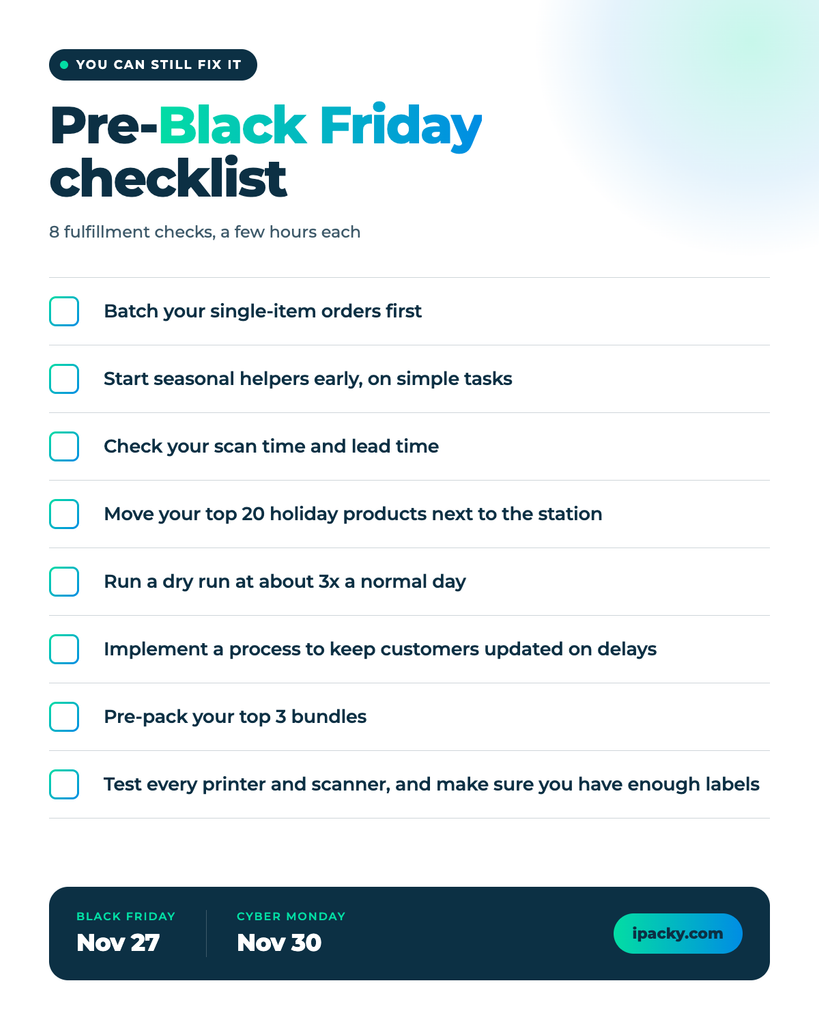
The good news is that you can still prepare better. We’ve collected seven recommendations you can put in place in a few hours each, with notes on how to do some recommendations in iPacky. You don’t need a new system or a bigger team. Pick what fits your warehouse, and start this week.
Key Takeaways: The 7 fixes at a glance
- Oversized boxes: measure the packed boxes of your top 10 products against carrier size limits.
- One order at a time: batch orders that share items.
- Late training: start seasonal helpers early, on simple tasks.
- Unmeasured time: check your scan time and lead time.
- Average-month shelves: move your top 20 holiday products next to the packing station.
- No dry run: test at about three times a normal day.
- Silent delays: tell customers before they ask.
Plus two quick bonus items: gift bundles, and printers and scanners.
Black Friday is November 27, and Cyber Monday follows on November 30. Below are seven fulfillment mistakes growing Shopify stores can still fix before then. For each one you’ll see what goes wrong and how to fix it.
Mistake 1: Letting oversized boxes eat your peak-season margin
One of the easiest peak-season costs to miss is the size of the boxes you use for your best-selling products.
Carriers such as UPS and FedEx apply additional charges when a package exceeds certain size limits. During peak season, shipping costs and surcharges can increase, so a box that is slightly larger than necessary can become surprisingly expensive.
The bigger problem is repetition. If an oversized box is used for a slow-moving product, the impact may be limited. If you use it for a bestseller that ships hundreds or thousands of times during peak season, you pay the same unnecessary surcharge again and again. A small packaging mistake can quickly turn into a significant fulfillment cost.
How often does it happen?
Every time that product is shipped in the same oversized packaging. The higher the sales volume, the more expensive the mistake becomes.
The fix
Before peak season, review your top 10 best-selling products and measure the actual packed boxes, not the products themselves. Compare those measurements with your carriers’ current size limits and seasonal surcharges.
If a package is close to a limit, test whether you can:
- use a smaller box;
- change how the product is positioned inside;
- reduce unnecessary protective material;
- use alternative packaging that keeps the shipment below the surcharge threshold.
Even a small reduction in box size can generate savings on every order throughout the season.
In iPacky: iPacky’s box calculation add-on can automatically calculate the optimal packing box for each order, based on the dimensions of your products and the boxes you have available. It considers how the items can actually fit inside the box, rather than relying only on total volume. This helps packers avoid choosing unnecessarily large boxes and reduces trial and error during packing.
Mistake 2: Picking one order at a time
Picking is where a surprising amount of time disappears. If a picker walks to the same shelf for order one, then again for order two, then again for order three, you pay for the same walk three times.
The bigger problem is volume. On a normal day, the extra walking is an annoyance. During peak season, when order numbers multiply, it turns into hours of lost time and a growing backlog.
How often does it happen?
Every time a picker collects one order at a time instead of grouping orders that share items.
The fix
A note first: batch picking doesn’t suit every business. If you sell large or bulky products, such as lawn mowers, orders often have to be picked one at a time. But if you sell smaller items, such as gloves, and you haven’t tried grouping orders yet, it is worth testing this week.
If your products allow it, group orders so that one trip fills several of them. Start simple:
- collect every order that contains just one product and pick them together (single-item batching);
- then group orders that share other items;
- try it on a normal day this week, so it feels routine by Black Friday.
In iPacky: Picking lists support batch picking, so you can pick products for several orders at the same time. On a mobile device you can pick on screen instead of printing paper. If you add a bin location to each product, iPacky works out an efficient picking path, so nobody runs back and forth.
Mistake 3: Training seasonal helpers when the rush has already started
Extra hands only help if they know what to do. When new people join during the busiest week, they ask questions, hesitate and make mistakes, and your best people stop their own work to help them.
The bigger problem is timing. Training takes the most time exactly when you have the least of it.
How often does it happen?
Every time seasonal staff start in the same week that volume spikes.
The fix
Train before the rush, not during it:
- start temporary help in the first days of November at the latest;
- give new people simple, clearly defined tasks, and keep complex work with your core team;
- pair each newcomer with an experienced colleague for their first shifts;
- put a one-page guide at each station;
- cross-train people, so any station can be covered if someone is out.
In iPacky: turn on photos and order history before peak. Packers can take photos during order check, and you can require them for tagged or high-value orders. The order history shows who checked an order and how many deviations there were, such as wrong scans or manual entries. Together they help you settle complaints and spot patterns to fix.
Mistake 4: Not knowing how long each order really takes
Small delays are easy to ignore. Five extra seconds per order sounds like nothing. Over 1,000 orders, it is 5,000 seconds: about 83 minutes, every day.
The bigger problem is that most stores never measure it. Without numbers, you can’t tell whether the slowness is in the order check itself or somewhere else.
How often does it happen?
Every day, on every order. The delay is simply invisible until you measure it.
iPacky splits each order’s time into two parts. Scan time is how long the order check itself takes. Lead time is the gap before it: fetching products, finding a box, anything that happens before scanning starts. Together they make the pack time.
Here is what that looks like in one example from the iPacky dashboard, a small account where 8 orders were checked:
| Measure | Average per order |
| Scan time | 0:56 |
| Lead time | 10:07 |
| Pack time | 11:03 |
The check itself is a small slice. Most of the time sits between orders. This is a small example, so the gaps are long, and on a busy floor the split will look different. The habit matters more than the numbers: look at both.
The fix
Spend 30 minutes on your own numbers:
- open the report for one ordinary day and note your average scan time and lead time;
- look first at whichever is larger;
- drill down by packer to see whether the gap is the same for everyone, or sits with one person or one step;
- fix that one thing, then check again.
In iPacky: The dashboard shows scan time, lead time, pack time, packed orders per hour and an estimate of how long the open orders will take, and it refreshes every 60 seconds. Reports show each packer’s performance and the scan time per item. A full-screen view for a wall monitor lets your team see the current workload.
Mistake 5: Arranging your shelves for an average month
Your shelves are probably arranged for a normal month. In the fourth quarter, that layout stops matching what customers buy. Imagine a jumper that sells five units a month all year and 200 in November, while summer products turn into dead weight that takes up space.
The bigger problem is distance. If a peak-season best seller sits at the far end of the warehouse, every pick pays for that walk, hundreds or thousands of times.
There is a second problem: finding things. If product locations live in people’s heads (“it’s on the left, near the back”), every new helper needs someone to show them around, and every pick takes longer. A bin location solves this. It is a simple code for the exact spot of a product in your warehouse, such as aisle, shelf and bin, so anyone can go straight to it.
How often does it happen?
On every order that includes a product stored far from the packing station, or one that nobody can find quickly.
The fix
Re-arrange for peak, not for average:
- pull last November and December sales and list your top 20 products (no history yet? use the last 30 days);
- move them to the shelves closest to the packing station;
- put items that are often bought together side by side;
- label every shelf and bin clearly, since seasonal helpers lose the most time searching;
- give every product a bin location, and update it each time you move something.
In iPacky: You can enter a bin location for each product. It shows on the order-check screen and on picking lists, and iPacky uses it to work out the most efficient picking path, so nobody runs back and forth. Helpers don’t need to remember where everything is, which makes training easier and faster. After you move your top sellers, update their bin locations and the picking paths follow your new layout.
Mistake 6: Waiting for Black Friday to find your bottlenecks
The worst time to find a bottleneck is Black Friday morning. Whatever is fragile in your process, such as slow label printing, a crowded packing table or boxes running out, shows itself the moment orders arrive.
The bigger problem is that peak volume is hard to imagine. A process that works comfortably on a normal day can break at three times the volume.
How often does it happen?
Every year, for any store that has never tested at a higher volume.
The fix
Run a dry run on a quiet day:
- hold back orders for two or three days, then release them together (about three times a normal day);
- walk a few returns through your process too;
- watch where the line stops: picking, the check, labels, or boxes running out;
- fix the first thing that breaks, then run it again.
Mistake 7: Letting customers find out about delays on their own
Some delays can’t be avoided: a storm, a carrier problem, a supplier running late. What you control is whether customers hear about it from you first.
The bigger problem is silence. A customer who doesn’t know where their order is writes to support, asks for a refund, or leaves a bad review.
How often does it happen?
Every time an order runs late and no message goes out.
The fix
Tell customers bad news before they have to ask:
- set up automatic updates for the moments that matter: an order sitting 24 hours past its expected dispatch, 48 hours past its promised delivery, or a carrier reporting an exception (use whichever email or notification tool you already have);
- be specific, and give a new date instead of just a warning;
- prepare two versions of the message: one for outside causes such as weather, and one for processing delays.
Compare two messages:
- Vague: “Your order is delayed.”
- Specific: “Your order is running two days late because of high demand. The new expected delivery is Friday, December 11, still well ahead of Christmas.”
The vague one sends customers straight to support. The specific one gives them a date to plan around.
Why two versions? A delay caused by weather feels temporary and outside your control, and customers accept it. A “processing delay” sounds like your mistake, and it is more likely to produce tickets and lost customers.
Bonus: two small things that cause big headaches
Gift bundles built order by order
If popular gift sets are assembled from scratch for every order, the packing table quickly becomes the bottleneck.
The fix: pre-kit your top bundles, pre-fold boxes before the rush, and run wrapping or inserts as a separate step so they don’t stall everything else.
In iPacky: virtual products let you define a kit made of other products. When an order contains the kit, every member product has to be scanned, so nothing ships incomplete. The built-in version doesn’t update inventory for the member products, so iPacky recommends the Bundles app if you need that.
A printer or scanner that stops on Black Friday
A dead label printer or scanner can stop the whole line, and peak day is the worst time to find out.
The fix: test every printer and scanner this week, replace the weak ones, and keep spare label rolls and a backup device on hand.
Once peak starts: a 10-minute check every day
During peak, look at orders shipped, backlog and errors every day, not every week. Fast feedback lets you fix a bottleneck in hours instead of finding it after the weekend. In iPacky, the dashboard front page shows orders packed and open orders, and the reports can be filtered to show only orders with deviations.
Final thoughts
Peak season rewards the stores that prepared early, not the ones that worked hardest on the day. None of these fixes needs a new system or a bigger team: they are measurements, layout changes and a few settings.
If the checklist feels long, start with three: measure your best-seller boxes, run a dry run, and check your scan time and lead time. Then work down the list. If you want help setting any of it up in iPacky, contact us.
Scale your orders, not packing mistakes.