

support for international customs codes
It's time to stop worrying about packing errors &
Start packing like a pro

Big workload for exporting, and codes for customs declaration (HS code)
When using Shopify to export to other countries, there can be a lot of manual work.
So when you send to the US, it will use the HS code (customs code) registered on the variant. Since the US customs require a 10-digit code for the US only, this will mean extra handling during import customs declaration, and most likely higher import duties since they don’t have the correct info. This will lead to angry customers and delays.
Changing all your HS codes to the US variant is not a good solution, since this will be incorrect when exporting to other countries. The same applies to the EU for example.
To go in and edit each customs order line with the correct code for each order is a huge task.
The iPacky solution
Solution 1 (Recommended)
First, you have the default HS code in the product/variant in Shopify that will apply to all destinations unless a specific country/region HS code is set.
A new feature in Shopify is that now it’s possible to set the HS code per country/region. This means that if the destination country for your shipment is in this list, iPacky will use that one.
It can look like this:
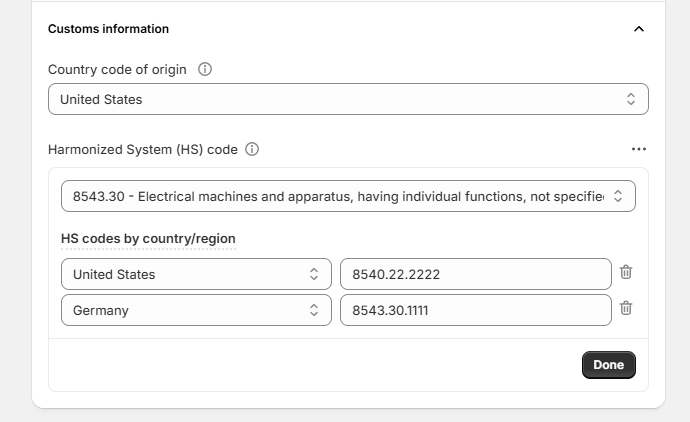
Here you can add more HS codes for destinations. Just click on the three dots by Harmonized System (HS) code.
Read how to do that in Shopify here.
You also have settings in the shipping connector for:
- Default country of origin (when not set on the product in Shopify)
- Default HS code (when not set on the product in Shopify)
- Default HTSUS code (when not set on the product in Shopify)
Solution 2 (For export to the US only)
iPacky solves this in iPacky metafields by allowing you to add the US customs code (HTSUS) for each variant. Solution 1 is recommended, but can also be used in combination with Solution 2.
You can do an export to Excel of all your Shopify products in iPacky metafields. Then use Excel to add the HTSUS code, and import it back to iPacky.
Or, you can edit the HTSUS code for a single variant in iPacky’s Edit metafield.
When sending to the US, iPacky will fill in the HTSUS code in the customs declaration. And for other countries it will use the HS code from Shopify.
You can even set a default HTSUS code in the shipping connectors if the product does not a HTSUS code in Shopify. Most useful when you’re selling one type of products.
This solves the extra work to manually edit the customs code when sending to the US. So it’s a huge time saver!
When one day Shopify supports this natively, we will make a function available to populate this info from iPacky to Shopify.
Logic for selecting HS code
- If the destination country has a matching entry in the HS code in Shopify, use that one
- If sending to the US, and a matching HTSUS from Solution 2 exists, use that one
- If the destination country is an EU country, and match on setting for use EU country code, use that HS code
- If no HS code found on the product in Shopify, and Default HS code is set in shipping connector setting, use that one
These solutions will only work when you use the shipping connectors in iPacky, such as Webshipper, Sendcloud, Starshipit, Ship&Co etc.